> For the complete documentation index, see [llms.txt](https://kb.rezonate.io/llms.txt). Markdown versions of documentation pages are available by appending `.md` to page URLs; this page is available as [Markdown](https://kb.rezonate.io/core-integrations/crowdstrike-integration.md).
# CrowdStrike Integration
High-level information regarding the CrowdStrike integration
{% hint style="info" %}
:tada: Rezonate has officially announced the integration with CrowdStrike. \
read more about it in the [CrowdStrike marketplace](https://marketplace.crowdstrike.com/partners/rezonate)
{% endhint %}
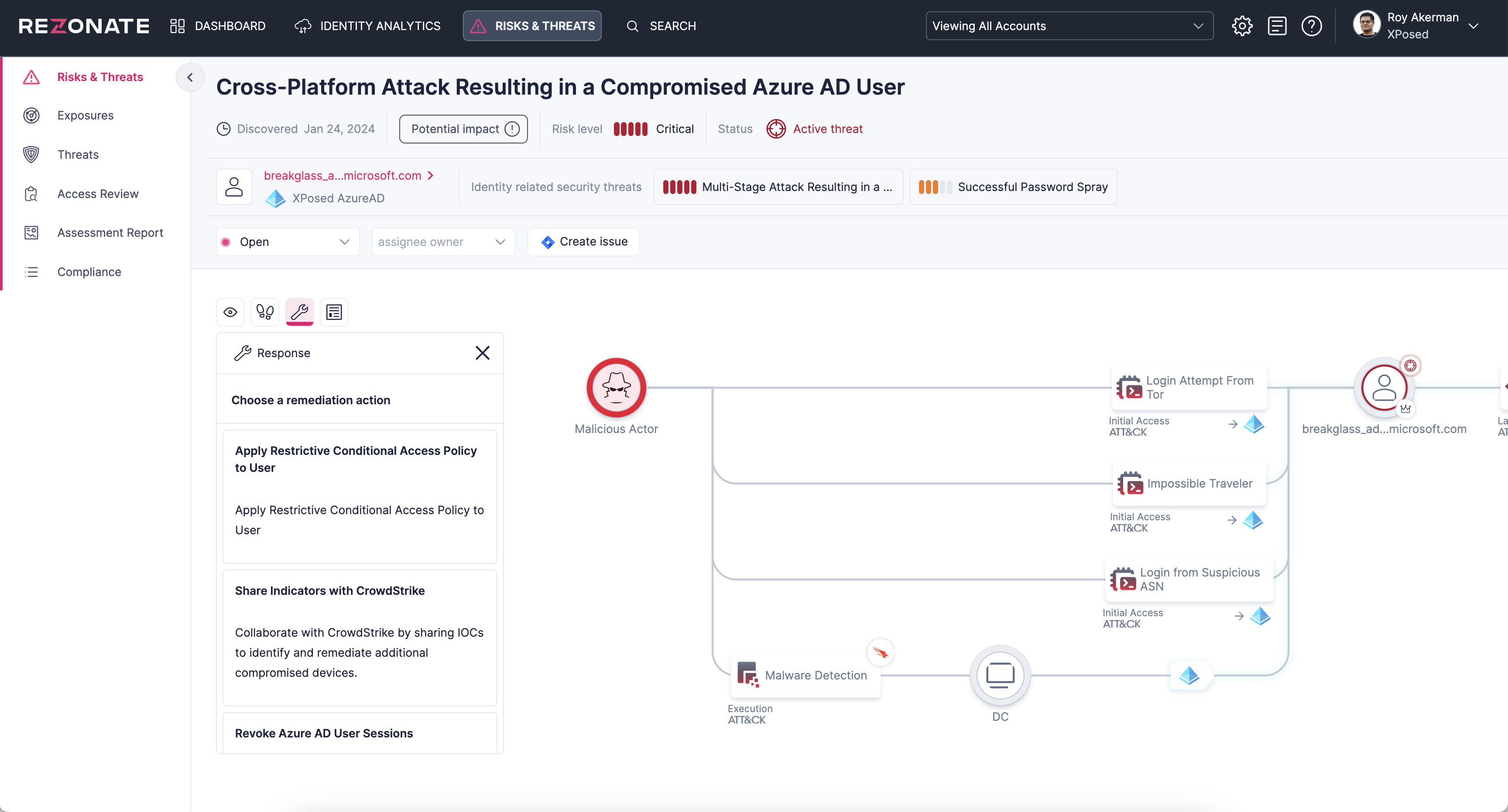
Rezonate integrates with the CrowdStrike Falcon® platform to extend threat detection, response, and attack analysis to identities across cloud, SaaS, and identity providers. With this integration, SOC analysts can seamlessly correlate user-machine and cloud identity data, monitor activity, and assess the potential impact of compromised endpoints on cloud privileges. By bilaterally sharing threat signals and enabling response actions across the CrowdStrike and Rezonate platforms, security teams can detect and block lateral movement between on-premises and cloud environments, stopping attacks at any stage.
### Unified detection and response orchestration
Bilaterally share real-time threat signals from CrowdStrike and IOCs from Rezonate across platforms to improve threat detection and prevention of lateral movement, account takeovers, and cloud/SaaS privilege abuse
### Blast radius analysis
Extend the discovery of identities and privileges from CrowdStrike Falcon® Identity Protection across cloud, SaaS, and identity providers to enhance containment and minimize the damage of a potential attack
### Identity and access investigation
Streamline investigation of suspicious user and machine activities across cloud infrastructure, SaaS, and identity providers with shared real-time monitoring insights from Rezonate in the Falcon platform
ITDR Detection - Example, Rezonate.
### Adding the integration
1. Set up the integration as defined in the [Integrating Permissions](/core-integrations/crowdstrike-integration/integrating-permissions.md).
2. Browse to the Rezonate Integration Page, and select the "Add new integration" button
3. Select CrowdStrike and fill out the form (Enter Account ID, And afterwards, the relevant API Key)